Best 3D Printer for Beginners 2026: US Guide

Design and making background since school. Bambu Lab owner — regularly printing projects with my kids and practical fabrications around the house. 3D printing sits right where design thinking meets problem solving.
Just so you know, some links on this page are affiliate links. If you buy something via them, we get a small kickback. You don't pay more, but it helps toward filament and test prints.
Your first 3D printer will teach you more than any guide can. Quick answer: the Creality Ender 3 V3 SE if you want to learn how printers work, or the Flashforge Adventurer 5M if you want good prints with less hassle. But there are six solid options now, including multi-color printing under $250, so here's the full picture.
Quick Picks
| Printer | Build Volume | Best For | |
|---|---|---|---|
| Creality Ender 3 V3 SE | 220×220×250mm | Learning how printers work | Check Price on Amazon |
| Anycubic Kobra 2 Neo | 220×220×250mm | Tightest budget | Check Price on Amazon |
| Flashforge Adventurer 5M | 220×220×220mm | Fast printing, enclosed | Check Price on Amazon |
| Sovol SV06 ACE | 220×220×250mm | All-rounder with Klipper | Check Price on Amazon |
| Creality K2 SE | 220×215×245mm | Multi-color capable | Check Price on Amazon |
Prices shown are approximate at time of review. Click "Check Price on Amazon" for current pricing.
Full Comparison
| Feature | Ender 3 V3 SE | Kobra 2 Neo | Adventurer 5M | SV06 ACE | K2 SE |
|---|---|---|---|---|---|
| Price | ~$199 | ~$159 | ~$279 | ~$249 | ~$249 |
| Build Volume | 220×220×250 | 220×220×250 | 220×220×220 | 220×220×250 | 220×215×245 |
| Max Speed | 250mm/s | 250mm/s | 600mm/s | 300mm/s | 500mm/s |
| Auto Leveling | Yes | Yes | Yes | Yes | Yes |
| Enclosed | No | No | Yes | No | No |
| Multi-Color | No | No | No | No | Yes (CFS) |
| Setup Time | 1–2 hours | 30 min | 15 min | 1 hour | 10 min |
| Firmware | Marlin | Marlin | Proprietary | Klipper | Custom |
| Community | Massive | Large | Medium | Medium | Growing |
| Best For | Learning | Budget | Speed + safety | Tinkerers | Multi-color |
Be Honest With Yourself
Expect your first week to involve failed prints, calibration frustration, and YouTube tutorials at midnight. This is normal. Every maker on r/3Dprinting went through it. By week three, you'll wonder what the fuss was about.
So which type are you: someone who wants to understand the machine, or someone who wants to skip straight to making stuff?
Best for Learning: Creality Ender 3 V3 SE (~$199)
The Creality Ender 3 V3 SE is the most recommended beginner printer for a reason. *(Price when reviewed: ~$199 | Check Price on Amazon)* Auto bed leveling removes the biggest beginner frustration. The Sprite direct drive extruder handles various filaments. And millions of people own Ender 3 variants, so every problem has a documented solution on YouTube or Reddit.
Assembly takes 1–2 hours. You'll learn where every belt and bolt goes. That knowledge pays off when something needs adjusting later, and it teaches you transferable skills that apply to any printer you upgrade to.
Why it wins for learners: When something goes wrong (and it will), you'll understand what each part does and how to fix it. The Ender 3 community is the largest in 3D printing. Any error message, weird artifact, or failed print has been solved by someone and documented online.
Best Budget: Anycubic Kobra 2 Neo (~$159)
If $199 is more than you want to spend, the Anycubic Kobra 2 Neo gets you into 3D printing for under $160. *(Price when reviewed: ~$159 | Check Price on Amazon)*
Same 220×220×250mm build volume as the Ender 3, auto bed leveling, and 250mm/s print speeds. The build quality is solid for the price. Anycubic's community isn't as large as Creality's, but it's active and helpful. The main compromise is the extruder, functional but not as refined as the Ender 3's direct drive setup. You'll get good PLA prints, but may hit limitations earlier if you move to trickier filaments like PETG or TPU.
For a first printer to test whether you enjoy the hobby, $159 is hard to argue with.
Best for Speed and Safety: Flashforge Adventurer 5M
The Flashforge Adventurer 5M is the fastest printer in this guide at 600mm/s. The fully enclosed build chamber means better results with temperature-sensitive filaments, and the enclosure adds a genuine safety benefit. *(Price when reviewed: ~$279 | Check Price on Amazon)*
The enclosure is a real advantage for beginners. It keeps dust out, maintains stable temperatures, and means no exposed hot parts. If you have children or pets near the printer, the enclosed design is worth the premium alone. Setup takes about 15 minutes. WiFi connectivity means you send prints from your computer without moving an SD card.
Best All-Rounder: Sovol SV06 ACE (~$249)
The Sovol SV06 ACE runs Klipper firmware out of the box, more optimization options than Marlin-based printers. Direct drive extruder, PEI spring steel build plate (prints pop off when cool), built-in camera for remote monitoring. (Price when reviewed: ~$249 | Check Price on Amazon)
The all-metal hotend handles PETG and TPU from day one without upgrading anything. Klipper is a double-edged sword for beginners: more to learn, but also more to optimize once you're ready. For tinkerers who want to grow with the machine, the SV06 ACE rewards the investment.
Best for Multi-Color: Creality K2 SE (~$249)
The Creality K2 SE is the cheapest way into multi-color 3D printing right now. *(Price when reviewed: ~$249 | Check Price on Amazon)* The CFS (Color Filament System) holds 4 spools and handles automatic filament changes mid-print. Connect up to 4 CFS units for 16-color prints.
The die-cast aluminum frame is noticeably rigid. At 500mm/s with 20,000mm/s² acceleration, it prints fast. The direct drive extruder has a quick-swap nozzle and automatic filament cutter for clean color transitions. Multi-color does add complexity, color changes waste a small amount of filament and prints take longer. But the results are impressive for the price.
Total Cost of Getting Started
| Item | Ender 3 V3 SE | Kobra 2 Neo | Adventurer 5M | SV06 ACE | K2 SE |
|---|---|---|---|---|---|
| Printer | $199 | $159 | $279 | $249 | $249 |
| PLA filament (1kg) | $19 | $19 | $19 | $19 | $19 |
| Tools | $12 | $12 | $0 (included) | $12 | $0 (included) |
| IPA + cloth | $8 | $8 | $8 | $8 | $8 |
| SD card | $7 | $7 | $0 (WiFi) | $0 (WiFi) | $0 (WiFi) |
| Month 1 total | ~$245 | ~$205 | ~$306 | ~$288 | ~$276 |
| Monthly running | $15–25 | $15–25 | $15–25 | $15–25 | $15–30 |
Running costs are mostly filament. One kg of PLA prints roughly 100–150 small objects. Electricity adds $2–4/month at US average rates.
Your First Month
| Week | What Happens | What You Learn |
|---|---|---|
| 1 | Assembly, first successful print, first failed print | How the printer moves, what bed leveling does |
| 2 | Settings experiments, downloading from Thingiverse | Layer height vs speed tradeoffs |
| 3 | Understanding why prints fail, results stabilizing | Temperature tuning, adhesion tricks |
| 4 | Prints you're actually proud of | Slicer confidence, support placement |
Materials to Start With
PLA only. It prints at low temperatures (190–220°C), doesn't warp, doesn't smell much, and forgives mistakes. The Amazon Basics PLA (~$19/kg) is consistent and cheap for learning.
*(Price when reviewed: ~$19 | Check Price on Amazon)*
The fancy materials, PETG, TPU, ABS, can wait until you have consistent PLA results. Each new material introduces new calibration variables. Learn one at a time.
Slicer Software (Free)
The slicer converts your 3D model into printer instructions. You need one before your first print.
Cura: The standard starting point. Free, works with every printer, massive community, default profiles for most machines. Most YouTube tutorials reference Cura settings, a strong reason to start here.
Bambu Studio: Polished interface, excellent for fast printers. If you buy the K2 SE or an enclosed printer, consider this as your slicer.
PrusaSlicer: Open source, more control. The choice for users who want to dig into advanced settings later.
Start with Cura unless you have a reason to use something else. The default profile for your specific printer handles 80% of what you need.
What to Print First
1. The Benchy, the standard calibration boat. Every maker prints one. It tests overhangs, bridges, small details, and cooling all at once. 2. A calibration cube, prints fast, shows you exactly how accurate your X/Y/Z dimensions are. 3. Something useful, a cable clip, a phone stand, a container. This is when 3D printing stops feeling like a hobby and starts feeling like a tool.
Find all three (and thousands more) free on Thingiverse and Printables.
Common Problems and Fixes
| Problem | Cause | Fix |
|---|---|---|
| Won't stick to bed | Unclean surface or poor level | IPA clean, re-level, move Z-offset closer |
| Spaghetti (mid-print collapse) | First layer failed | Better adhesion, add brim in slicer |
| Stringing | Retraction too low or temp too high | Enable retraction, drop temp 5°C |
| Layer shifting | Loose belt or speed too high | Tighten belts, reduce print speed |
| Warping at corners | Bed too cold or drafts | Raise bed temp, eliminate drafts |
FDM vs Resin: Should You Consider Both?
Everything in this guide covers FDM printers, the right starting point for almost everyone. Resin printers offer incredible detail for miniatures and jewelry, but require chemical handling, dedicated ventilation, and more post-processing per print. Start with FDM, get comfortable with the workflow, and add resin later if you specifically need the detail only it delivers. See our [FDM vs resin guide](/guides/fdm-vs-resin-printer-us).
Your First Upgrade
Before buying upgrades, learn your printer. Most "necessary upgrades" solve problems caused by poor calibration, not equipment limitations. After 2–3 months of consistent printing, consider:
- An all-metal hotend, if you want to print PETG or TPU reliably (the Ender 3 V3 SE already handles both via its Sprite direct drive; the Kobra 2 Neo benefits from this upgrade) - **A filament dryer**, if you notice degraded print quality from moisture-absorbed filament - Better filament, the jump from Amazon Basics to Prusament PLA is noticeable once you can see the difference
See our upgrade guide for what's actually worth fitting at each price point.
Common Questions
Do I need to design my own 3D models? Not at all. Thingiverse, Printables, and Cults3D host hundreds of thousands of free designs, functional parts, miniatures, decorative pieces, and everything between. Most beginners start exclusively with downloaded models. Learning 3D modeling (Fusion 360 for mechanical parts, TinkerCAD for simple objects, Blender for artistic work) opens up the full potential of the hobby, making exactly what you need, but it's absolutely not required to start.
How loud are 3D printers? Varies by model. Budget printers like the Ender 3 produce moderate motor and fan noise, audible in the same room but not disruptive with the door closed. Enclosed printers like the Adventurer 5M are significantly quieter, often under 50dB. If the printer lives in a bedroom or shared space, factor noise into your decision. The K2 SE and SV06 ACE fall in between.
How much space do I need? The Ender 3 V3 SE footprint is about 16×16 inches, plus clearance for the filament spool. A desk, shelf, or countertop is fine, you don't need a workshop. Most printers run fine in a living room or bedroom since PLA doesn't produce fumes requiring special ventilation.
What can I actually make in the first month? Phone stands, cable clips, wall hooks, dice, plant labels, small containers, replacement parts for broken household items, and decorative items. By week three most beginners are printing things they genuinely use around the house. The jump from "hobby toy" to "useful tool" happens faster than most people expect.
Is 3D printing expensive to run? No. PLA filament costs $15–25/kg, and one kg prints roughly 100–150 small objects. Electricity adds $2–4/month at typical US rates. Nozzles cost $1–3 each and last 50–100 prints. The biggest investment is the printer itself and your time learning it. After the initial purchase, running costs are lower than most hobbies.
Should I start with FDM or resin? FDM. Resin printers produce incredible detail for miniatures and jewelry, but require chemical handling, ventilation, and a dedicated wash-and-cure workflow. Learn 3D printing fundamentals on FDM first, no chemicals, simpler workflow, cheaper running costs. Add a resin printer later if you specifically need the detail it provides. See our [FDM vs resin guide](/guides/fdm-vs-resin-printer-us).
Filament Storage and Care
Filament quality degrades when exposed to moisture. PLA is relatively tolerant, but even PLA prints noticeably worse after sitting open in a humid room for two weeks. Wet filament produces popping sounds during printing, rough surface texture, and weak layer adhesion.
Minimum storage: Keep open spools in large ziplock bags with silica gel desiccant packets. This costs under 10 dollars and prevents most moisture problems. Reseal the bag after every printing session.
Better storage: A dedicated filament dry box (15 to 25 dollars) holds one or two spools with integrated desiccant and a feed hole so you can print directly from the box. This is the setup most regular printers settle on within their first three months.
Once you have your machine, the 3D printer setup guide US covers first-time configuration step by step.
**If filament gets wet:** A filament dryer (30 to 50 dollars) heats the spool at low temperature for several hours, driving out absorbed moisture. This restores most filament to usable condition. If you print less than weekly, a dryer is worth owning because your filament sits idle long enough to absorb meaningful moisture between sessions.
**How to tell filament is wet:** Listen during printing. Wet filament produces audible popping or crackling as moisture turns to steam inside the nozzle. The print surface looks rough and inconsistent rather than smooth. Stringing increases even with good retraction settings. If you hear popping, dry the spool before continuing.
Community Resources
The 3D printing community is one of the most helpful maker communities online. When you hit a problem (and you will), these resources solve it faster than trial and error.
Reddit: r/3Dprinting (2 million plus members) and r/ender3 are the first places to search. Post a photo of your failed print with your settings and someone will diagnose the issue within hours. The community has seen every failure mode and knows the fix.
YouTube: Teaching Tech, Thomas Sanladerer, and CNC Kitchen produce calibration guides and deep-dive testing that helps you understand why settings work, not just which numbers to use. Teaching Tech's calibration website walks you through every setting step by step.
Discord servers: Most printer brands have official Discord communities with real-time help. The Creality, Bambu Lab, and Prusa servers are particularly active. Faster responses than Reddit for urgent problems.
Local maker spaces: Many cities have maker spaces with 3D printers and experienced users willing to help beginners. Check your local library too, many US libraries now offer 3D printing services and introductory workshops.
What to Avoid
Printers under $100 with no-name branding: Below the Creality/Anycubic floor, quality control is unpredictable. Nozzle clogs out of the box, inconsistent beds, and zero community support make cheap printers genuinely more frustrating to learn on than slightly more expensive ones.
**Resin as a first printer:** Resin printers produce incredible detail, but they require chemical handling, dedicated ventilation, and a post-processing workflow that adds 20–30 minutes to every single print. Learn 3D printing on FDM first. Add resin later if you specifically need what it delivers.
Buying a printer without checking r/3Dprinting first: Every mainstream printer has documented failure modes. A 5-minute search reveals whether "mine broke at 200 hours" is common or an outlier. Know what you're buying.
Upgrading before learning: Most upgrade purchases in the first 3 months solve problems that better calibration would have fixed for free. Print 50–100 pieces before spending money on hardware changes. The exception: a PEI spring steel bed is genuinely worth fitting early if your printer doesn't include one.
Buy the printer, print something, fail, troubleshoot, succeed. Repeat. Reading guides helps, but the learning happens through doing. Your terrible first Benchy is more valuable than any amount of research.
For the full US buying guide covering all budgets and use cases, see the best 3D printers US.
For budget-focused recommendations, see the best 3D printers under $500 US.
What You'll Need With It
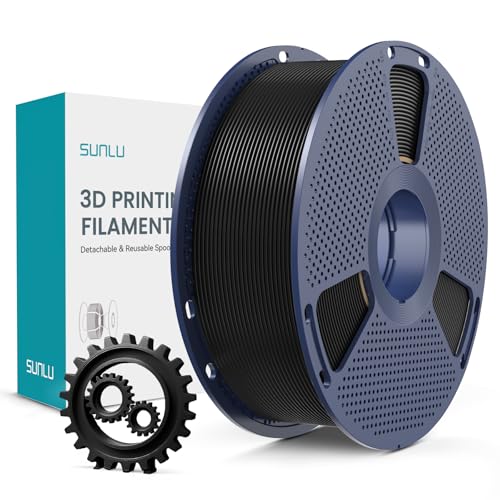
Mid-tier PLA+ filament with enhanced toughness. Best-seller on Amazon UK with thousands of reviews. Strong, reliable, smooth results. Great value when discounted to around £13. The step-up from basic PLA.

Double-sided magnetic flexible build surface (smooth and textured PEI). Excellent adhesion for PLA, PETG, ABS, TPU without glue. Easy part removal by flexing the spring steel. Solves warping and adhesion issues.
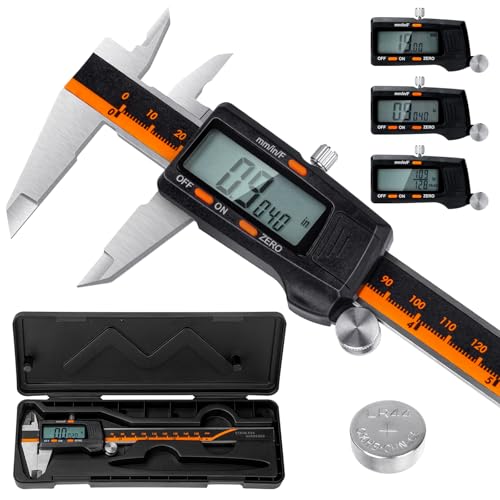
Laboratory-grade accuracy (0.01mm resolution, ±0.02mm accuracy) for measuring filament diameter, print dimensions, and calibration. Hardened stainless steel construction. Essential for proper calibration and quality control.
As an Amazon Associate, we earn from qualifying purchases.