Best 3D Printer UK 2026: Complete Buying Guide

Design and making background since school. Bambu Lab owner — regularly printing projects with my kids and practical fabrications around the house. 3D printing sits right where design thinking meets problem solving.
Just so you know, some links on this page are affiliate links. If you buy something via them, we get a small kickback. You don't pay more, but it helps toward filament and test prints.
Best 3D printer in the UK right now? For most people, it's the Bambu Lab A1 Mini. Auto-calibration, fast prints, minimal fuss. If you want to learn how printers actually work, get the Creality Ender 3 V3 SE. If budget isn't an issue, the Bambu Lab P1S is as close to "just press print" as you'll get.
That's the short version. Below I've broken down eight printers I'd actually recommend across every budget, plus what you need to know before buying. Before you settle on a budget, I'd also suggest running a few numbers through our print cost calculator to see what filament and electricity add up to once the machine is on your desk.
The Picks
Best Budget: Creality Ender 3 V3 SE The Creality Ender 3 V3 SE is the default recommendation for anyone starting out. *(Check Price on Amazon)* Auto bed levelling via CR Touch, sprite direct drive extruder, and the biggest community in 3D printing. Build volume is 220x220x250mm, which handles most projects. Print speed tops out around 250mm/s, though you'll run slower for quality prints. Every problem you'll hit has a YouTube solution.
You'll need to assemble it (about 30 minutes) and spend time calibrating. This isn't a downside. You'll learn how your printer works, which matters when things go wrong. And they will go wrong. That's part of the hobby.
Best Overall: Bambu Lab A1 Mini This is the printer r/3Dprinting recommends most right now. Auto-calibration, fast print speeds (up to 500mm/s), and it works out of the box with minimal tinkering. For a little more than the Ender 3, you skip most of the frustration. The build plate is smaller at 180x180x180mm, so check your project sizes.
The trade-off? Smaller community, proprietary ecosystem, and you learn less about how printers work. Bambu's slicer (Bambu Studio) is polished but locks you in slightly. If you just want good prints quickly, that's a fair trade.
Best Mid-Range: Flashforge Adventurer 5M The Flashforge Adventurer 5M is fully enclosed out of the box. *(Check Price on Amazon)* That matters more than you'd think. Enclosure keeps temperature consistent, reduces warping, blocks drafts, and makes it much safer in households with kids or pets. Print speed hits 600mm/s and the quick-swap nozzle system means changing between 0.4mm and 0.6mm nozzles takes seconds. Build volume is 220x220x220mm.
One of the quietest printers available too. Flashforge claims under 50dB, and in practice it's much quieter than the Ender 3. If the printer will live in a shared space, this matters.
Best for Tinkerers: Sovol SV06 ACE The Sovol SV06 ACE sits between the Ender 3 and premium machines. (Check Price on Amazon) Open-source firmware, PEI spring steel bed (prints pop off when cool), and direct drive extrusion. Build volume is 230x230x250mm. Not as fast as the Bambu machines but everything is repairable and upgradeable, which appeals to the kind of person who enjoys the mechanical side.
Best Value Multi-Colour: Anycubic Kobra 2 Neo The Anycubic Kobra 2 Neo is the cheapest printer here and honestly prints well above its price. *(Check Price on Amazon)* 25-point auto-levelling, 250mm/s max speed, and a 220x220x250mm build area. The LeviQ 2.0 levelling system works well enough that first prints usually succeed.
If you want to spend as little as possible and still get decent results, this is the one. Don't expect the build quality or speed of a Bambu, but for functional prints and learning, it's fine.
Best Reliable: Original Prusa MK4S The Original Prusa MK4S costs more than everything else on this list except the K1 Max. *(Check Price on Amazon)* What you're paying for is Prusa's engineering and support. Open-source firmware (PrusaSlicer is excellent), modular hotend, input shaper for vibration compensation, and customer support that actually helps. Build volume is 250x210x220mm.
Prusa machines run for years with minimal maintenance. I know people with original MK3s from 2017 still printing daily. If you're printing functional parts or prototypes and need consistency over speed, Prusa earns the premium.
Best Large Format: Creality K1 Max The Creality K1 Max has a 300x300x300mm build area, which is enormous. *(Check Price on Amazon)* Enclosed CoreXY design, 600mm/s max speed, AI camera for print monitoring, and HEPA filtration for printing ABS. If you're printing helmets, cosplay armour, or large mechanical parts, this is the size you need without spending over a grand. Want multi-colour at this size too? My Bambu X2D vs Creality K2 Plus comparison weighs two enclosed multi-material machines, one dual-nozzle and one big CFS, head to head.
The K1 Max had firmware issues at launch but Creality has sorted most of them through updates. Check the Creality subreddit for the latest firmware version before buying.
Best Resin: Anycubic Photon Mono 4 The Anycubic Photon Mono 4 is a resin printer, which works completely differently to everything above. (Check Price on Amazon) UV light cures liquid resin layer by layer, producing detail that FDM can't match. Miniatures, jewellery moulds, dental models. My [FDM vs resin comparison](/guides/fdm-vs-resin-printer) covers when each type makes sense.
Resin printing needs ventilation. The uncured resin is toxic and the fumes aren't pleasant. You'll also need a wash-and-cure station (about £60-80 extra), IPA for cleaning, and nitrile gloves. Budget £250-300 total for a complete resin setup. More detail in my [resin printer guide](/guides/best-resin-printer-uk).
Quick Comparison
| Printer | Build Volume | Speed | Type | Best For |
|---|---|---|---|---|
| Anycubic Kobra 2 Neo | 220x220x250mm | 250mm/s | FDM | Ultra-budget |
| Anycubic Photon Mono 4 | 132x74x165mm | N/A | Resin | Miniatures, detail |
| Creality Ender 3 V3 SE | 220x220x250mm | 250mm/s | FDM | Learning, community |
| Bambu Lab A1 Mini | 180x180x180mm | 500mm/s | FDM | Easy, fast prints |
| Sovol SV06 ACE | 230x230x250mm | 300mm/s | FDM | Open-source tinkering |
| Flashforge Adventurer 5M | 220x220x220mm | 600mm/s | FDM | Quiet, enclosed, safe |
| Creality K1 Max | 300x300x300mm | 600mm/s | FDM | Large prints |
| Prusa MK4S | 250x210x220mm | 200mm/s | FDM | Reliability, long-term |
How to Choose
Three questions narrow the field:
1. What are you printing? Functional parts (phone mounts, brackets, enclosures) and large objects need FDM. Miniatures, figurines, and high-detail work needs resin. Most people start with FDM.
2. How much tinkering do you want? The Bambu machines and Flashforge just work. The Ender 3 and Sovol teach you how printers work but demand more patience. Neither approach is wrong, but be honest about which camp you're in.
3. Where will it live? Open-frame printers (Ender 3, A1 Mini) are louder and produce fumes with certain materials. An enclosed printer (Flashforge, K1 Max, or the new Elegoo Centauri Carbon) is better for living spaces, offices, or homes with children. Resin printers need a ventilated area, ideally a garage or spare room.
Build volume matters but people overestimate how large their prints will be. 220x220mm handles 95% of hobbyist projects. Only go larger if you have a specific need.
Running Costs
3D printing is cheap to run once you own the printer.
**Filament (FDM):** PLA costs £15-22 per 1kg spool. A 1kg spool prints dozens of small objects or several large ones. Expect to spend £5-15 per month depending on usage.
**Resin:** £25-40 per litre. Resin printers use less material per print but the resin costs more, and you'll use IPA for cleaning (about £10/litre). Monthly cost is similar to FDM for hobbyist use.
Electricity: A typical FDM printer draws 200-350W while printing. Running 8 hours a day, that's roughly £3-5 per month on a UK energy tariff. Not significant.
Maintenance: Nozzles wear out every 3-6 months of heavy use (£3-5 each). Belts and fans last years. Resin printers need the FEP film replaced occasionally (£8-10 per sheet). None of this is expensive.
Slicer Software
Every printer needs slicer software to convert 3D models into printable instructions. All of these are free:
- PrusaSlicer works with any FDM printer. Open-source, excellent defaults, huge community. My pick for Ender 3 and Sovol users. - Bambu Studio comes with Bambu printers. Fork of PrusaSlicer with Bambu-specific features. Use this if you buy a Bambu. - Orca Slicer is a community fork that combines the best of PrusaSlicer and Bambu Studio. Works with everything. Growing fast. - Chitubox or Lychee for resin printers. Both have free tiers that handle basic slicing.
For 3D models, browse Printables (Prusa's community), Thingiverse, or MakerWorld (Bambu's platform).
Buying in the UK
Amazon UK stocks everything listed here. Delivery is fast but returns can be awkward for large items. Some alternatives worth knowing:
- 3DJake (3djake.uk) carries most brands, good customer service, UK warehouse. - Technology Outlet stocks Creality and ships from the UK. Good for Ender parts too. - Prusa ships direct from their factory in Czech Republic. Usually arrives in 3-5 working days. - Bambu Lab ships from EU warehouses. Delivery takes 4-7 days typically.
All of these retailers honour UK consumer rights. If a printer arrives faulty, you're covered.
What to Avoid
Not everything with "3D printer" in the title deserves your money. A few patterns to watch for:
Printers under £120. At this price, corners get cut on the hotend, frame rigidity, and quality control. You'll spend more time fixing the printer than using it. The Anycubic Kobra 2 Neo is the floor for a usable machine.
Discontinued models still listed on Amazon. The Ender 3 Pro and Ender 3 V2 still appear in search results. These are older designs without auto bed levelling, and firmware updates have stopped. The V3 SE replaced them for good reason.
Unbranded or white-label printers. If you can't find the manufacturer's website or a subreddit for the printer, walk away. When something breaks (and it will), you need community support and spare parts. No community means no solutions.
"Industrial grade" claims at consumer prices. Any printer advertising "industrial quality" for under £500 is stretching the truth. Industrial 3D printers cost many times more. What you're buying is a capable hobby machine, and that's perfectly fine.
Printers with no UK support or warranty. Some brands sell through third-party Amazon sellers with no UK returns process. Stick to brands with either direct UK distribution (Creality, Prusa, Bambu) or established Amazon UK fulfilment.
Support and Warranty
This matters more than most guides admit. When your printer arrives with a misaligned frame or develops a hotend clog at month three, you need someone to help.
| Brand | Warranty | Support Quality | Spare Parts |
|---|---|---|---|
| Prusa | 2 years | Excellent. Email response within 24 hours. Will walk you through fixes step by step. | All parts available on their website, ships from Czech Republic |
| Creality | 1 year | Slow but functional. 48-72 hour response times. Better support via their subreddit than official channels | Parts widely available on Amazon UK and 3DJake |
| Bambu Lab | 1 year | Improving. Started opaque, now has structured ticket system. Responsive on Discord | Parts available on their store, limited third-party options |
| Anycubic | 1 year | Adequate. Email support in English, usually responds within 48 hours | Parts on Amazon UK, good availability |
| Flashforge | 1 year | Decent UK support via their distributor | Nozzles and beds available on Amazon UK |
| Sovol | 1 year | Mixed reviews. Better through community forums than official support | Some parts on Amazon UK, most from their website |
Prusa charges more upfront but their support justifies it. For everyone else, the community forums and subreddits are your real support network. Before buying, search "r/[brand] support" on Reddit to see what current owners say.
Upgrade Path
Your first printer is not your last. Knowing where each machine leads saves you from buying into a dead end.
Creality Ender 3 V3 SE leads naturally to the Creality K1C or K2 SE (same ecosystem, same slicer profiles). The skills transfer directly. From there, Prusa is the next logical step for reliability.
Bambu Lab A1 Mini leads to the P1S or X2D within Bambu's ecosystem. The slicer, filament profiles, and workflow stay identical. Upgrading feels seamless but you're committed to the Bambu ecosystem.
Prusa MK4S doesn't lead anywhere because you don't need to leave. Prusa owners tend to buy a second Prusa rather than switching brands. The machine runs for years with minimal maintenance.
Sovol SV06 ACE is the tinkerer's upgrade ladder. Open-source firmware means you can migrate to Klipper, swap the hotend for a Revo, add a filament runout sensor. Each modification teaches you something. The SV06 ACE itself becomes a learning platform that grows with your skills.
The practical advice: Your first printer teaches you what you actually need from a second printer. Most people discover they want either more speed (leads to Bambu or Creality K-series) or more reliability (leads to Prusa). Don't plan the upgrade path before you've printed 50 objects on machine number one. By then you'll know exactly what matters to you.
The Honest Take
Don't overthink this. Any current printer from Creality, Bambu, Anycubic, or Prusa will produce good results. The difference between a budget print and a premium print is minimal with the right settings. What changes is how much frustration you'll tolerate getting there. Choose your patience level, not your budget.
If you're still unsure, the Bambu Lab A1 Mini is the best recommendation for most people. It just works. If you want to learn the mechanics properly, get the Ender 3 V3 SE and embrace the tinkering. For a closer look at the mid-range sweet spot, see my best 3D printer under £500 guide.
New to 3D printing entirely? My [beginner's guide](/guides/best-3d-printer-beginners-uk) covers setup, first prints, and common mistakes. And check my bed levelling guide before your first print.
The first time you hold a part you designed and printed yourself, something clicks. It stops being a gadget and starts being a genuine workshop tool. That shift happens faster than you'd expect, and once it does, you'll wonder how you ever managed without one.
What to Expect in Your First Month
Week 1: Assembly (20–60 minutes depending on printer), first print attempt, first failure, first successful print. The Bambu A1 Mini and Flashforge Adventurer 5M can have you printing within an hour. The Ender 3 and Sovol require more calibration time but teach you more in the process.
Week 2: Calibrating bed levelling, learning Z-offset adjustment, running your first multi-hour print. Expect at least one failure, either the print detaches mid-job or a setting is wrong. Both are normal. Both are fixable.
Week 3: Printing your first useful object. A cable clip, a phone stand, a container for your desk. This is the moment the hobby shifts from "cool toy" to "actual tool." Most beginners find something genuinely useful they want to make within the first three weeks.
Week 4+: Dialling in settings for different filament types, experimenting with layer heights and print speeds, starting to understand what your specific machine can and can't do reliably.
The learning curve is front-loaded. The first 20 prints are investment. After that, printing becomes reliable enough to start taking for granted.
Common Problems and Fixes
| Problem | Likely Cause | Fix |
|---|---|---|
| Print won't stick to bed | Surface dirty or Z-offset too high | Clean bed with IPA; lower Z-offset by 0.05mm increments |
| Print pops off mid-job | First layer didn't adhere | Re-level, ensure bed at correct temperature (55–60°C for PLA) |
| Spaghetti (collapsed structure) | First layer failure or nozzle clog | Better first layer, check nozzle for partial blockage |
| Stringing between parts | Temperature too high or poor retraction | Drop print temp by 5°C; increase retraction distance |
| Visible layer lines on top | Not enough top layers in slicer | Increase top layer count to 5–6 in slicer settings |
| Warping at corners | Bed too cold or draughts affecting print | Raise bed temp; block nearby air vents; use enclosed printer |
| Layer shifting (print looks sheared) | Loose belt or print speed too high | Tighten X/Y belts; reduce print speed by 20% |
| Grinding noise from extruder | Clog or tension too high | Check for blockage; release extruder arm and inspect |
The first four problems affect most beginners. They're all solvable with calibration, not replacement parts.
Materials: What to Buy First
You don't need to understand every filament before buying a printer. Start with PLA and learn everything else once the printer is running.
**PLA, start here.** Prints at 190–220°C nozzle, 50–60°C bed. Minimal warping, virtually no smell, works on every printer. Brittle under impact and softens above 60°C. Perfect for prototyping, display objects, and learning. A 1kg spool lasts most casual printers 2–3 months. Brands to start with: Prusament, eSUN, SUNLU, Polymaker, all reliable and available on Amazon UK for £15–22/kg.
**PETG, the functional upgrade.** Prints at 230–250°C nozzle, 70–80°C bed. Stronger and more heat-resistant than PLA, better for parts that need to survive real use. Slightly stringier and requires retraction tuning. Move to PETG when you need a bracket, mount, or enclosure that actually has to work. About £18–26/kg.
**TPU, flexible filament.** Prints at 220–235°C, 40–50°C bed. Used for phone cases, gaskets, flexible hinges, and wearable parts. Requires a direct drive extruder, check before buying. About £22–30/kg.
What to avoid at first: ABS and ASA require an enclosure and ventilation (fumes are unpleasant and potentially harmful). Engineering filaments (PC, nylon, PA-CF) need high-temperature hotends and enclosures. None of these are starting materials.
Safety
FDM printing is genuinely safe for home use with a few sensible precautions.
Thermal runaway protection: All printers listed here have it. This safety feature cuts power if the heating system malfunctions, it's the primary reason modern FDM printers are safe to run unattended.
Fire safety: 3D prints run for hours. Place your printer on a non-flammable surface. Keep it away from paper, fabric, and combustibles. A smoke detector in the same room is sensible. Some people use a small metal tray under the printer as an extra precaution. With thermal runaway protection and sensible placement, fire risk is very low.
Fumes: PLA produces negligible fumes at normal print temperatures, basic room ventilation is sufficient. ABS produces styrene fumes that warrant active ventilation or an enclosed printer with a carbon filter. If you're printing ABS regularly, invest in an enclosure with HEPA and activated carbon filtration.
Children and pets: Heated beds reach 60–100°C. Nozzles reach 200–260°C. Enclosed printers (Flashforge Adventurer 5M, K1 Max) mitigate burn risk significantly compared to open-frame machines.
Resin: Uncured resin is toxic, nitrile gloves every session, ventilation always. The fumes are unpleasant and can cause sensitisation with repeated exposure. Read the [resin printer safety guide](/guides/resin-printing-safety-guide) before touching liquid resin.
What You'll Need With It

Premium PLA with industry-leading ±0.02mm precision guaranteed. Every spool measured and verified. Predictable, reliable behavior ideal for critical prints. Worth the premium when quality matters.

360° all-round heating filament dryer with dual internal heating plates and built-in fan. Heats to 70°C. Touch screen displays temperature and humidity. Feed-through design allows printing while drying. Fixes moisture issues causing stringing and weak layers.
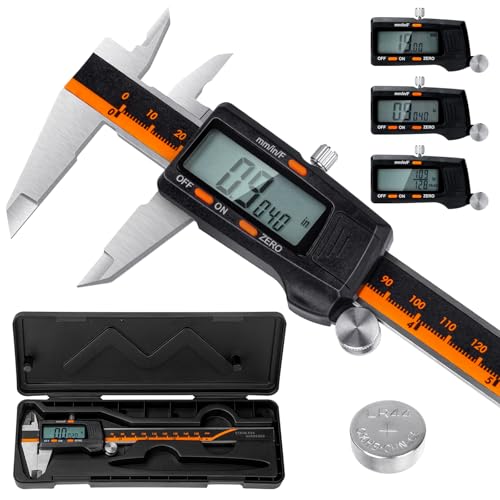
Laboratory-grade accuracy (0.01mm resolution, ±0.02mm accuracy) for measuring filament diameter, print dimensions, and calibration. Hardened stainless steel construction. Essential for proper calibration and quality control.
As an Amazon Associate, we earn from qualifying purchases.